
See it in action
One image. Processed in seconds.
This is real MetaBrain output — title with confidence score, description, and 45 scored keywords. No editing, no templates.

You shoot hundreds of photos and videos.
Tagging them takes longer than the shoot.
Professional microstock photographers spend 3–5 minutes per image writing titles, descriptions, and keyword sets. For a 200-image shoot, that's up to 16 hours of repetitive, low-value work.
Four Processing Modes
Four distinct workflows built for different shooting scenarios. Pick the one that fits your task and get started.
How it works
01
Drop your files
Drag images or videos directly into MetaBrain. Supports JPEG, PNG, TIFF, WEBP, EPS, AI, SVG, MP4, MOV and more.
02
AI generates metadata
The AI engine analyses your content and returns a scored title, description and 49 ranked keywords in seconds — or anywhere from 20 to 80 if you move the output slider.
03
Review and export
Edit any chip, confirm the result, then write metadata directly to your files or export as CSV for bulk upload.
All modes in action
Four workflows. One tool.
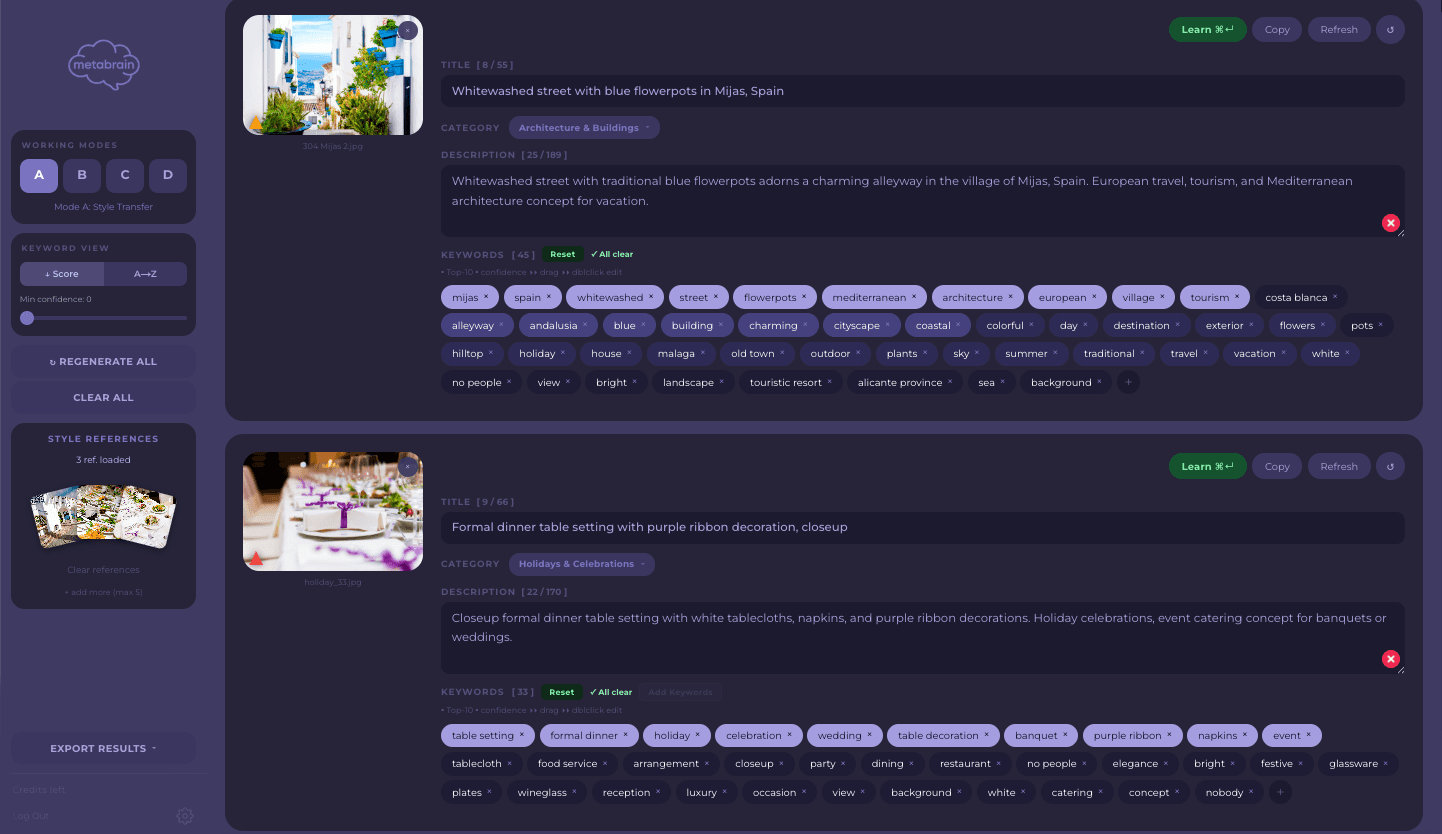
The default mode, right for most jobs: drop photos, videos or illustrations and get a ready title, description and keywords. Optionally add a few of your own shots on a similar subject and the new generation follows their style — useful for editorial series or brand consistency.
Optimised metadata for all major agencies
What we can do
Why not just ChatGPT?
The model is the easy part
Any chat model can write keywords. Whether buyers find the file — and whether the agency keeps those keywords at all — is decided by everything around that answer.
Words the agency will actually keep
Getty and iStock ingest only terms from their own controlled vocabulary and drop the rest without telling you. MetaBrain matches your keywords against it before export — against the agency’s own service, not a guess — and picks the right sense when a word has several. A chat window has no way to know that list exists. An unusual term can still come back unrecognised — you delete it in ESP.
It remembers your corrections
Say once that a word does not belong in your work and it stays out of every future batch; the words you always need stay in. A new chat starts from zero every time, and so does every file you paste into it.
Files leave ready to upload
Title, description and keywords are written into the files themselves, exported as CSV in each agency’s own column layout, and delivered over FTP/SFTP straight to Shutterstock, Adobe Stock, Pond5 and others. A chat hands you text you still have to place by hand, file after file.
Made for a shoot, not for a prompt
Drop three hundred files and walk away: four modes, keyword blocks, duplicate detection, and a separate angle per frame so a similar series is not rejected as duplicates. No prompt to maintain, no copy-paste per image.
The same models sit underneath. The difference is how much work is left on your side, and how much of your metadata survives the agency’s ingestion.
How we compare
| MetaBrain | Xpiks | StockSubmitter | PhotoKeyworder | M+ | |
|---|---|---|---|---|---|
| AI metadata from image | ✓ | Add-on | — | ✓ | Neural |
| Style transfer from your shots | ✓ | — | — | — | — |
| Custom keyword blocks | ✓ | — | — | — | — |
| Learns from your corrections | ✓ | — | — | — | — |
| Plain-text AI correction (Ground Truth) | ✓ | — | — | — | — |
| Unique variation per batch image | ✓ | — | — | — | — |
| Relevance scoring per keyword | ✓ | — | — | — | — |
| Rejection risk analysis | ✓ | — | — | — | ✓ |
| Brand & IP detection | ✓ | — | — | — | — |
| Market trend scoring | ✓ | — | — | — | — |
| Getty & iStock controlled vocabulary | ✓ | — | — | ✓ | — |
| Music & audio metadata | Beta | — | — | — | — |
| Photo support | ✓ | ✓ | ✓ | ✓ | ✓ |
| Video support | ✓ | ✓ | ✓ | ✓ | ✓ |
| Vector (EPS, AI, SVG) | ✓ | ✓ | ✓ | EPS only | ✓ |
| Batch processing | ✓ | ✓ | ✓ | ✓ | ✓ |
| Write metadata to files | ✓ | ✓ | ✓ | ✓ | ✓ |
| Direct agency submission | ✓ | ✓ | ✓ | — | ✓ |
| Free tier | 20 images | Basic | 33/mo | — | 33/mo |
| macOS | ✓ | ✓ | — | — | ✓ |
| Web App | ✓ | — | — | ✓ | ✓ |
Based on publicly available feature lists. Updated August 2026.
Pricing
Start free. Pay as you grow.
Start free with the core toolkit — all four modes, Trend Score, Inspector, IP Scanner and 22 export profiles. Starter adds Correction Intelligence and Ground Truth; Hobby adds processing history, trend briefs with recommendations and direct agency upload; Pro adds portfolio analytics and the offline local AI model. 20 free credits, no card required.
Free
Get started and explore MetaBrain with no commitment.
- ✓20 complimentary credits on sign-up
- ✓All four processing modes (A, B, C, D)
- ✓Trend Score, Inspector & IP Scanner
- ✓CSV (22 agency profiles), XMP, JSON & DOCX export
- ✓English, Spanish, Portuguese, Russian UI
Starter
For contributors who upload a few shoots a month and want the AI to learn their style.
- ✓150 AI generations per month
- ✓All Free tier features
- ✓Correction Intelligence — learns from your edits
- ✓Ground Truth — fix what the AI misread in plain words
Hobby
For photographers who upload regularly and need consistent output.
- ✓300 AI generations per month
- ✓All Starter tier features
- ✓Processing history (last 50 generations)
- ✓Trend briefs & recommendations
- ✓Direct upload to agencies (FTP/SFTP)
- ✓Email support
Pro
For professionals with high-volume shoots and agency deadlines.
- ✓900 AI generations per month
- ✓All Hobby tier features
- ✓Portfolio Coach — portfolio analytics (beta)
- ✓Local AI model — offline processing on your own Mac (LM Studio / Ollama)
- ✓Priority email support
Credits Pack
Available on any paid plan. Credits never expire and are consumed only when you process.
Payments securely processed by Paddle.com — Merchant of Record. All prices in USD. VAT may apply.

MetaBrain 3.1.6
macOS · Apple Silicon · Try free — 20 images, no card
Minimum
- ·macOS 12 Monterey
- ·Apple Silicon (M1)
- ·8 GB RAM
- ·2 GB free disk
Recommended
- ·macOS 13 Ventura+
- ·M1 Pro or newer
- ·16 GB RAM
- ·5 GB free disk
FAQ